
Key Summary
You sent the invoice two weeks ago. The client says it is processing. Your phone bill is due Friday. This is the standard side hustle problem, and it has nothing to do with how good you are at your work. It has everything to do with the gap between when money is earned and when it actually lands in your account.
Beem is built for exactly this situation. It is a financial app designed around irregular, unpredictable income, the kind that comes from freelance work, gig platforms, and one-person service businesses. This guide walks through how to use Beem to manage side hustle cash flow, cover short-term gaps, and stay on top of your finances even when income does not arrive on a schedule.
Who This Guide Is For
If any of these describe you, this guide was written for you.
- Freelancers who bill clients on net-30 or net-60 payment terms
- Gig workers on Uber, DoorDash, Instacart, Upwork, or Fiverr
- Service business owners including cleaners, tutors, photographers, and handymen
- 1099 contractors whose deposit timing changes week to week
- Anyone running a side hustle alongside a salaried day job
The common thread is that your income does not arrive in equal amounts on the same day every two weeks. That single fact breaks most traditional financial tools, and it creates the cash flow problems this guide addresses.
What Beem Is and Where It Fits
Beem is America’s Wallet. It is a free financial app that combines cash advances, AI-powered budgeting, real-time balance tracking, and automated savings tools in one place. It is not a bank or a payment processor for sending money to clients.
What Beem does is solve the money management problems that happen on your side of the equation. When a client pays you $800 and you have $620 worth of bills hitting this week, Beem shows you what you actually have available. When a payment is three days late and an expense cannot wait, Beem’s Everdraft covers the gap at zero cost. When you keep spending your tax savings before April, Beem automates the separation.
Beem fits into your workflow as the financial layer that sits between your irregular income and your fixed expenses. It does not replace your checking account. It makes your checking account work smarter for someone whose income looks nothing like a salary. You can get started at trybeem.com.
Why Side Hustle Cash Flow Is Harder Than It Looks
A salary is simple: same amount, same day, every two weeks. Side hustle income does not work that way. A $1,200 client payment arrives this Tuesday. Nothing comes in for three weeks. Then a $600 and $400 payment land on the same day from two different clients. Meanwhile, your rent, subscriptions, and phone bill all hit on fixed calendar dates that have no relationship to when your clients decide to pay.
The result is a constant juggling act. Many side hustlers bridge the gap with a credit card, planning to pay it off when the next client payment arrives. At 24% APR, even a one-week bridge on a $500 balance costs real money. Over a year, that habit adds up to hundreds of dollars in interest on gaps that closed within days. Beem eliminates that cost entirely.
How to Use Beem for Side Hustle Payments and Cash Flow
This is how Beem works in practice for someone running a freelance or side hustle business.
Everdraft: Bridge the Gap Between Invoice and Payment
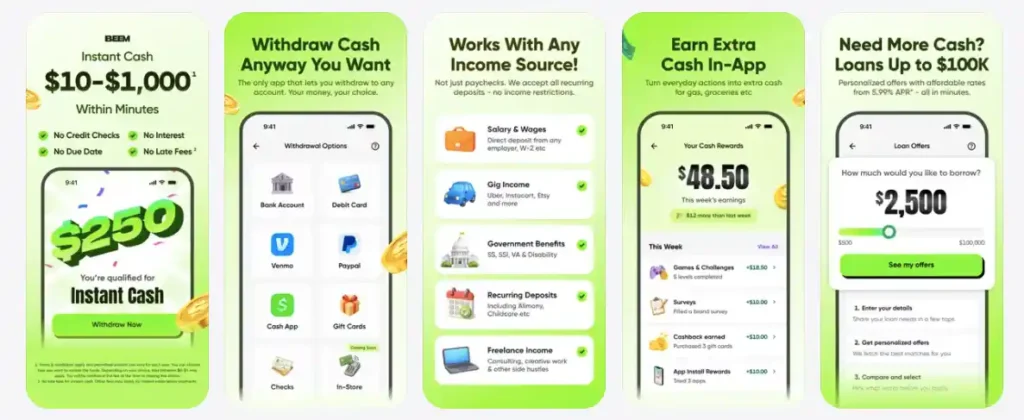
Everdraft is Beem’s cash advance feature. Eligible users can access up to $1,000 with no fees and no interest. There is no credit check and no multi-year repayment plan. The advance is repaid automatically when your next deposit arrives.
The use case is simple. Your client owes you $900 and the payment is processing. Your car insurance autopay hits tomorrow for $180. Instead of putting it on a credit card or paying a $35 overdraft fee, Everdraft covers it at zero cost. When the client payment lands, the advance is settled and you owe nothing extra.
BudgetGPT: Budget When Income Is Not Predictable
Traditional budgeting apps assume you have a fixed monthly income. When you are a freelancer, that assumption breaks the entire system. BudgetGPT is an AI-powered tool that learns your actual income pattern over time. It identifies when your strong earning months tend to arrive, flags when a slower stretch is likely coming, and adjusts your spending recommendations accordingly. For a gig worker who earns $3,200 one month and $1,400 the next, BudgetGPT builds a plan around real numbers rather than a fictional average.
Safe-to-Spend: Know What Is Actually Available Right Now
This feature solves one of the most common side hustle mistakes: seeing a large balance and spending it without realizing most of it is committed to upcoming bills. Safe-to-Spend calculates your real available balance after upcoming obligations are accounted for. Say you receive $800 from a client on Monday and your rent autopay is $620 on Friday. Safe-to-Spend shows $180, not $800. That distinction keeps you from accidentally spending money you do not actually have.
Sinking Funds: Set Aside Business Expenses Before They Arrive
Quarterly estimated taxes surprise side hustlers most often. The money was there in January. By April 15, it is gone, and the tax bill is still due. A Sinking Fund is a dedicated savings pocket inside Beem for a specific future expense. You set the target amount, set an automatic contribution percentage from each deposit, and the money builds separately from your spending balance. Run one fund for estimated taxes, one for annual software subscriptions, one for equipment. Each client payment routes a portion to each fund automatically.
Smart Wallet: Protect Your Business Buffer
Smart Wallet is a protected balance layer separate from your everyday checking balance. Without it, most side hustlers keep everything in one account. When a slow month hits or a client payment falls through, there is no buffer, and the next bill becomes a crisis. Smart Wallet keeps that buffer funded and protected so a bad week does not become a financial emergency.
A Week in the Life: How a Freelancer Uses Beem
Here is how these features work together in one real week for a freelance graphic designer.
Monday morning: A client pays $1,200 via Zelle. BudgetGPT flags that an $85 phone bill and a $55 software subscription both hit Thursday. Safe-to-Spend updates to show $1,060 actually available. Sinking Funds automatically pulls $240 into the quarterly tax fund.
Wednesday: An unexpected $180 car repair comes up. Everdraft covers it with no fee and no interest.
Friday: A second client pays $600. The deposit arrives, Everdraft is repaid automatically, and the rest rolls into the week’s budget. Smart Wallet adds $100 to the emergency buffer.
End of the week: No credit card debt added. No overdraft fee paid. No interest charged. The tax fund grew by $240.
Beem vs Using Your Bank Account Alone
| What You Need | Bank Account Only | Beem |
| Bridge a 3-day payment gap | Overdraft fee or credit card | Everdraft, zero cost |
| Budget with irregular income | Manual spreadsheet | BudgetGPT auto-adapts |
| Know real spendable balance | Check and calculate manually | Safe-to-Spend, real-time |
| Save for quarterly taxes | Willpower and a separate account | Sinking Funds, automated |
| Protect an emergency buffer | Discipline alone | Smart Wallet, separated |
The bank account is still necessary. Beem works alongside it and adds structure, automation, and a zero-cost safety net a checking account alone cannot provide.
How to Set Up Beem for Your Side Hustle in 4 Steps
Getting started takes under ten minutes.
- Download the Beem app and create a free account at trybeem.com
- Connect your primary checking account where client payments land
- Set up a Sinking Fund for quarterly taxes right away, before you need it
- Enable Safe-to-Spend so every balance check shows what is actually available
Start with those four steps. Once comfortable, add a Smart Wallet buffer and configure BudgetGPT with your typical monthly income range. The goal is to have the structure in place before the next payment gap arrives, not during it.
Frequently Asked Questions: Beem for Business Payments
Can self-employed people use Beem?
Yes. Beem is designed for people with irregular income, including freelancers, 1099 contractors, and self-employed workers. BudgetGPT and Sinking Funds are built around income that does not arrive on a fixed schedule.
Does Beem work for 1099 contractors?
Yes. There is no requirement to have a W-2 job or a fixed salary. Everdraft eligibility is based on your deposit activity, not your employment type.
How does Everdraft help freelancers between client payments?
Everdraft provides up to $1,000 with no fees and no interest to bridge the gap between when a payment is owed and when it arrives. It is repaid automatically from your next deposit.
Can I use Beem to save for quarterly estimated taxes?
Yes. Sinking Funds is built for exactly this. Set a target amount, assign an automatic contribution percentage from each deposit, and the money accumulates separately from your everyday balance.
Is Beem free for side hustle and freelance use?
Beem offers a free account tier. Core features including Everdraft and Safe-to-Spend are accessible without a paid subscription for eligible users. Visit trybeem.com for current plan details.