
Key Summary
Beem‘s AI Wallet is a paycheck management tool built into the Beem app that automatically divides your income into bills, savings, and spending the moment a deposit gets credited. Instead of manually transferring money or relying on willpower to stick to a budget, the wallet does the organizing for you based on your actual financial commitments and habits.
According to the CFPB, the average American household struggles with bill timing more than with total income levels, meaning the problem is often sequencing rather than earning. Beem’s AI Wallet addresses this directly by reserving bill money first, contributing to savings goals second, and making remaining funds available for daily spending without ambiguity. This guide covers how the wallet works, how to set it up in six steps, and how to get consistent results from it over time.
Understanding How Beem’s AI Wallet Works
The AI Wallet operates on one principle: every dollar has a destination before you spend it. When your paycheck arrives, the wallet analyzes your upcoming bills and due dates, your active savings goals and contribution schedules, and your recent spending patterns across different categories. From these three inputs, it calculates how to divide the deposit and executes the split automatically.
The wallet updates its calculations each pay cycle. If you overspent on dining last cycle, it adjusts. If a bill amount changed, it recalibrates. Unlike traditional budgeting apps that show you what happened to your money after the fact, the AI Wallet acts before you spend. That distinction changes how money management feels. You stop reacting to your account balance and start operating from a structured plan set up before the first dollar moved.
Are Digital Wallets Like BEEM secure?
Your financial data security is a priority. Beem employs bank-level encryption to ensure that your information remains protected. The AI Wallet uses read-only access to analyze your transactions, meaning it can observe and organize your finances without the ability to move funds outside the automated paycheck split system you control. All connections to your financial institutions are secured, ensuring that your data is never sold and is used only to manage your budget efficiently.
Also Read: How to Plan Paychecks Around Due Dates
Why Splitting Paychecks Is More Effective Than Traditional Budgeting
Most budgeting methods require sustained effort and active attention to function. Spreadsheets require manual updates. Bank alerts require you to check and interpret them. Expense tracking apps show you the damage after you have already overspent. All of these tools are observation systems, not prevention systems.
Splitting your paycheck transforms budgeting from a reactive exercise into a proactive one. The moment your income arrives, bills are funded, savings are contributed, and the remaining amount becomes your true spending money rather than your total account balance. There is no mental overhead in determining what you can afford because the system has already made those allocations. The system also reduces emotional spending by giving you a clear number for each category rather than an open-ended account balance that can feel like permission to spend freely.
This approach eliminates the most common cause of overspending: the illusion of a full account balance in the first few days after payday. When you see a $2,400 deposit and your rent is $1,200 due in ten days, the $2,400 feels available even though only $1,200 actually is. A paycheck split removes that illusion immediately.
Step by Step: How to Use Beem’s AI Wallet to Split Your Paycheck
Setting up the AI Wallet takes around ten to fifteen minutes for the initial configuration. After that, it runs automatically every pay cycle without much input.
Step 1: Connect Your Income
The AI Wallet begins by identifying your paycheck deposits. Connect your primary bank account or income source within the Beem app. Once your paycheck is deposited, the wallet recognizes the transaction and initiates the split.
Connecting your income also helps Beem understand your pay frequency. Whether you are paid weekly, biweekly, or monthly, the wallet adjusts your plan to your cycle. Gig workers and freelancers with variable deposit amounts are supported, since the wallet recalculates the split based on the actual deposit amount each time rather than assuming a fixed income.
Step 2: Add Your Bills and Due Dates
Add every recurring bill to the wallet, including rent or mortgage, utilities, insurance, loan payments, and subscriptions. Enter the due date for each one so the wallet can schedule funding allocations ahead of time.
Many people have bills clustered in the first week of the month right before or after a paycheck, creating gaps where the account looks flush but the money is already committed. The wallet identifies these clusters and reserves the necessary amounts starting from the previous deposit so there is no gap between what the account shows and what is actually available to spend.
Step 3: Create Savings Goals
Add your savings goals with target amounts and optional target dates. The wallet calculates the per-cycle contribution needed to reach each goal on schedule and incorporates that amount into the paycheck split automatically.
The CFPB recommends that adults maintain at least three months of expenses in emergency savings. The AI Wallet makes progress toward this goal automatic by treating savings contributions as a committed expense rather than an optional transfer that gets skipped when the month feels tight. If you fall behind due to a high-expense month, the wallet adjusts the contribution schedule rather than abandoning the goal.
Step 4: Set Your Spending Categories
Beem tracks your past spending and groups it into categories: groceries, transportation, dining, personal care, and discretionary spending. These become the spending buckets that receive the remaining money after bills and savings are funded.
Knowing that your dining budget for the week is $85 rather than seeing $1,100 in your checking account results in meaningfully different spending decisions. You can customize categories, add new ones, and modify limits at any time. The wallet continues to learn from your actual spending and surfaces patterns that may not be immediately obvious, like consistent overspending in a subscription category you rarely use.
Step 5: Turn on Automatic Paycheck Splitting
Once your bills, savings goals, and spending categories are configured, enable automatic paycheck splitting. From this point, every deposit triggers an automatic split: bills funded first, then savings contributions, then spending categories loaded with the remainder.
You do not need to approve or trigger the split manually. You open the app after a deposit and see the organized breakdown: what is reserved for bills, how much went to each savings goal, and how much is available to spend freely.
Step 6: Review and Adjust With Each Paycheck
After the wallet runs for two to three pay cycles, spend five minutes reviewing the results. Check whether your spending categories match your actual habits, whether any bills changed, and whether your savings progress is on track.
If you consistently have leftover money in a spending category, redirect a portion to savings. If a category runs short before the next paycheck, either raise the limit or review recent transactions to identify what changed. Small adjustments over time produce a system that fits your actual life rather than a generic template.
How Beem Ensures Bills Always Get Paid First
Bill coverage is the highest-stakes part of any paycheck management system. A missed rent payment or utility bill triggers fees, damages credit history, and can create cascading financial problems. Beem treats bill funding as the first allocation from every deposit, before savings contributions and before spending money is released.
When your paycheck arrives, the wallet checks which bills are approaching and reserves those amounts immediately. You can see in real time exactly how much of your current balance is reserved for bills versus how much is genuinely free, which removes the guesswork that leads to accidental overspending in the days after payday.
How Beem Helps You Build Savings Without Thinking About It
Savings goals fail most often because contribution happens at the wrong moment in the paycheck cycle. When you try to save at the end of the month from what is left over, there is usually nothing left. The AI Wallet solves this by treating savings contributions as a committed expense that happens at the start of the pay cycle, not at the end.
As soon as bills are funded, savings contributions go out automatically. You never see that money in your spending balance, so you are not tempted to spend it. The wallet also identifies opportunities to accelerate progress. If a spending category consistently runs under budget, it may suggest redirecting the surplus to a savings goal. These small suggestions, followed consistently, compound into meaningful progress over months.
Real Examples of How Beem’s Paycheck Splitting Helps
Example 1: Monthly Rent Cycle
Someone paid biweekly needs to reserve half their monthly rent from each paycheck. The wallet automatically allocates the correct amount from each deposit so the full rent amount is ready before the due date without any manual transfers or calendar reminders.
Example 2: Income Fluctuations
A freelancer receives different deposit amounts each cycle. The wallet recalculates the split based on the actual deposit rather than a fixed income assumption. Bills stay funded in full. Savings contributions adjust proportionally. Spending money reflects what is genuinely available for that specific cycle rather than an average from previous months.
User Success Stories
Many users have found clarity by switching to automated paycheck splitting. For instance, consider a gig worker who previously struggled with the volatility of biweekly deposits. By setting up the AI Wallet, they no longer had to stress about budgeting for rent when a deposit was lighter than expected; the wallet automatically adjusted their spending buckets, ensuring the rent was covered first while still leaving room for daily essentials.
Similarly, a salaried employee found that automating their emergency savings contributions as a “first bill” rather than an “end-of-month leftover” helped them reach their three-month emergency fund goal in less than a year, despite previously failing to save consistently for nearly a decade. These stories highlight that regardless of income stability, the system adapts to the user’s life, not the other way around.
Using Beem’s Everdraft to Smooth Out Cash Flow
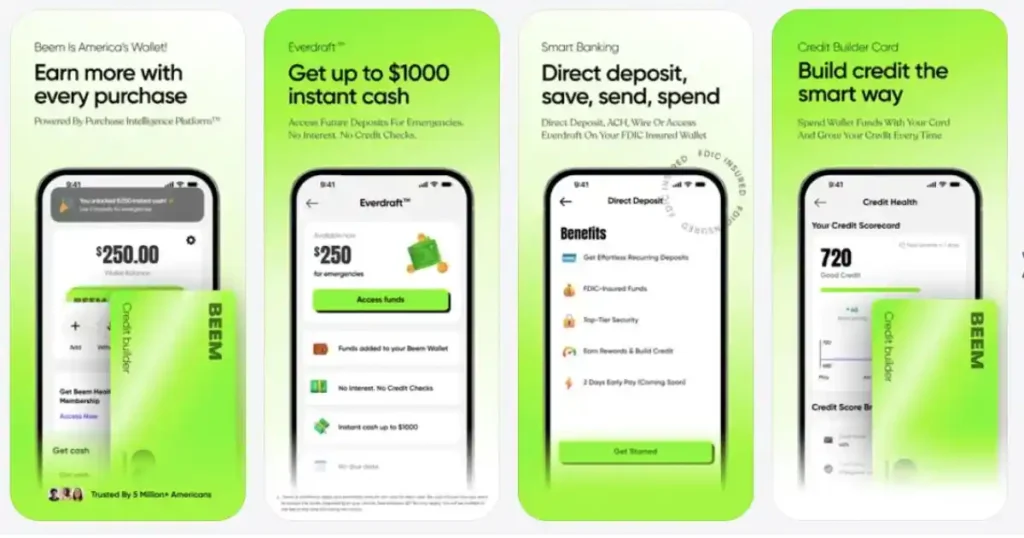
Even a well-configured paycheck split cannot fully eliminate cash flow gaps, particularly for workers with irregular income or large bills that arrive at inconvenient times. Beem’s Everdraft feature provides up to $1,000 with no fees and no credit check to cover gaps when the next deposit is still a few days away.
Everdraft works alongside the AI Wallet rather than replacing it. When a gap appears, the advance covers the shortfall without disrupting the bill and savings allocations already in place. When the next deposit arrives, the wallet resumes normal operations and the advance repays automatically.
How Beem Works Better Than Traditional Budget Apps
Most budget apps are tracking tools. They record what you spent and show you reports. Beem’s AI Wallet is an action tool. It organizes money at the moment of deposit rather than analyzing what happened afterwards. This means you are never operating from outdated numbers or catching problems after the fact.
Traditional apps also use fixed category amounts that do not adapt to income changes. The AI Wallet recalculates every category based on each actual deposit, so your plan always reflects your current financial reality. Tracking apps like Mint or YNAB require consistent manual categorization and review to stay accurate, which is where most people fall off the system within the first few weeks.
Tips to Stay Consistent With Paycheck Splitting
Keep your bills list updated whenever an amount changes. Review your categories once a month to catch lifestyle changes before they undermine your allocations. Let the wallet make pattern-based adjustments rather than manually overriding its recommendations after every cycle. Review your savings goals at least twice a year to confirm they still reflect your current priorities.
When to Adjust Your Paycheck Split
Certain events warrant a deliberate review: a raise or pay cut, a new recurring bill, paying off a loan, starting a new savings goal, or consistently running over or under budget in a specific category. The wallet handles most adjustments automatically, but these changes are significant enough to warrant checking that the inputs are still accurate.
Troubleshooting Common Issues
While the system is designed for automation, occasional adjustments may be needed.
- Paycheck Delays: If your paycheck arrives later than expected, the AI Wallet will wait for the deposit before triggering the split. Your bill allocations remain queued and will execute as soon as the funds land.
- Bank Connection Errors: If your bank connection requires re-authentication, you will receive a notification in the app. Simply re-link your account to restore the automated flow.
- Missed Splits: If you suspect a split didn’t trigger, verify that your account connection is active. You can manually trigger a review or adjust your settings within the wallet dashboard to ensure your next deposit is captured correctly.
Frequently Asked Questions
Does the Beem AI Wallet work with irregular income?
Yes. The wallet recalculates the paycheck split based on the actual deposit amount each time rather than assuming a fixed income. Gig workers and freelancers with variable deposits are fully supported. Bills are funded in full from each deposit, and savings contributions adjust proportionally based on what actually arrived that cycle.
Can I change my savings goals or category limits after setting them up?
Yes. You can edit any goal, category limit, bill amount, or due date at any time within the app. The wallet recalculates your next paycheck split immediately after you save the changes. There is no need to rebuild the plan from scratch when your circumstances change.
What happens if a deposit is smaller than what my bills and savings require?
The wallet prioritizes bills first in all cases. If a deposit is smaller than the full bill and savings allocation, bills are funded in full and savings contributions adjust downward proportionally. Spending category budgets reflect whatever remains after bills are covered, protecting your most critical obligations from every deposit regardless of size.
Does the AI Wallet require a subscription?
Beem’s pricing details are available at trybeem.com. The core wallet functionality, including paycheck splitting and bill tracking, is part of the standard Beem account. Everdraft cash access is also available within the app. Check current pricing on the Beem website for accurate and up-to-date fee information.
Conclusion
Beem’s AI Wallet turns the paycheck from a single large deposit that disappears into scattered spending into a structured financial event that moves every dollar to its intended destination. Bills are covered before you can accidentally spend the money. Savings grow without requiring a deliberate decision each cycle. Spending money reflects what is genuinely available, not the total account balance.
The system works best when you keep your bills and goals updated, review category amounts monthly, and follow the wallet’s pattern-based suggestions as they surface over time. For cash flow gaps that the paycheck split cannot fully cover, Beem’s Everdraft provides a no-fee bridge that keeps the plan intact until the next deposit arrives.