
Key Summary
Most budgeting advice assumes a calendar month is the right unit to plan around. But your money does not actually move on a calendar month. It moves on your paycheck cycle, and if your pay dates do not line up neatly with the first and last day of the month, a generic monthly budget can leave you guessing where you actually stand. BudgetGPT, Beem’s AI powered budgeting feature, is built to solve that specific problem by analyzing your real transactions and helping you plan around the 30 days that actually matter, the ones between one paycheck and the next.
This guide walks through how BudgetGPT works, how to use it to build a realistic 30 day plan around your own paycheck cycle, and how its alerts and reminders help you stay on track without doing the math yourself.
Why Paycheck Cycle Budgeting Works Better Than Calendar Month Budgeting
A calendar month budget assumes every dollar you earn and spend resets on the first. In reality, most people get paid biweekly, semimonthly, or on a schedule that shifts slightly depending on weekends and holidays. That mismatch creates a common problem, feeling like you are broke at the end of the month even though your actual paycheck cycle has not run out yet, or the reverse, feeling flush right after payday and losing track of what still needs to be covered before the next one lands.
Planning around your actual paycheck cycle instead of the calendar month fixes this. It means your budget reflects the real 30ish days you have to make a paycheck stretch, not an arbitrary date on a calendar. BudgetGPT is designed around this idea, using your real account activity rather than generic assumptions to help you see exactly what is happening in your specific cycle.
What BudgetGPT Actually Does
BudgetGPT works by connecting to your bank account and analyzing your transaction history to build a clear picture of your spending, without you having to manually categorize a single purchase.
Automatic Spend Insights
Once connected, BudgetGPT organizes your spending into simple categories automatically, so you can see where your money is actually going without digging through statements or building a spreadsheet. This is the foundation for everything else, since a 30 day plan is only useful if it is based on real numbers rather than a guess.
Ask Anything, Get Answers
One of the more useful parts of BudgetGPT is the ability to ask direct questions about your money and get an immediate answer. Instead of manually calculating whether you can afford something, you can type a question like how much you spent on food this month, or whether you will make rent, and get an answer based on your real transaction data. This turns budgeting from a periodic chore into something you can check in on throughout your paycheck cycle whenever you actually have a question.
Smart Alerts and Nudges
BudgetGPT includes pre-built money alerts that are designed to trigger automatically based on your spending patterns, flagging things like overspending or low balances as soon as they happen rather than after the fact. These alerts come pre-built into the app, and you can delete or clone them depending on what you want to track.
Custom Tasks and Reminders
Beyond automatic alerts, BudgetGPT lets you set your own reminders tied to your specific paycheck cycle. You can create a task like checking your food spending every Sunday evening, with frequency options for daily, weekly, or monthly reminders on a custom day and time. This is where a lot of the value of paycheck cycle planning comes in, since it lets you build check-ins around your own schedule instead of a generic monthly reminder that does not match how you actually get paid.
Read: How to Budget Monthly with BNPL Purchases
How to Build a 30 Day Plan Around Your Paycheck Cycle Using BudgetGPT
Here is a practical way to put BudgetGPT to work over a full paycheck cycle, from the day you get paid through the day before your next deposit lands.
Step 1: Connect Your Account and Review Your Baseline
Start by linking your bank account so BudgetGPT can begin organizing your spending into categories. Once it has a clear picture of your recent activity, take a look at where your money went over your last full paycheck cycle. This baseline is what your 30 day plan will actually be built around, rather than a rough estimate.
Step 2: Ask BudgetGPT About Your Fixed Costs
Use the ask anything feature to get a clear picture of your recurring costs for the cycle ahead, things like rent, subscriptions, and regular bills. Knowing exactly what is locked in before you plan anything else gives you a realistic starting point for the rest of your 30 days.
Step 3: Set Alerts Around Key Dates in Your Cycle
Every paycheck cycle usually has a few pressure points, a bill due date, a rent payment, or a stretch where spending tends to creep up. Use BudgetGPT’s task feature to set reminders around those specific dates, rather than relying on a single generic monthly check-in. A reminder to review spending a few days before rent is due, for example, gives you time to adjust if something looks off.
Step 4: Ask Directly Whether You Will Make It
Instead of trying to calculate your remaining balance against upcoming bills manually, ask BudgetGPT directly whether you will make rent, or whether a specific expense fits within what is left in your cycle. Getting a direct answer based on your actual transaction data removes a lot of the guesswork that makes people avoid checking their finances in the first place.
Step 5: Review Smart Alerts as They Come In
As your 30 day cycle progresses, let BudgetGPT’s pre-built alerts flag overspending or low balance situations as they happen. Catching a pattern early in the cycle, rather than discovering it the week before your next paycheck, gives you room to actually adjust instead of just reacting.
Step 6: Check In at the End of the Cycle
Once you reach the end of your 30 day cycle, review what BudgetGPT tracked against what you expected. This is where the automatic spend insights become useful again, showing you a clear picture of the full cycle so you can carry any adjustments into the next one.
Why This Approach Works Better Than a Static Budget
A static budget built once and left untouched tends to fall apart the moment something unexpected happens, an irregular bill, a slightly late paycheck, or a month with an extra expense. Because BudgetGPT is built around real transaction intelligence rather than fixed assumptions, it adjusts to what is actually happening in your account, not what you predicted at the start of the month.
The combination of automatic insights, direct question and answer, and customizable reminders means your plan can flex around your actual paycheck cycle instead of forcing your paycheck cycle to fit a rigid plan. That flexibility is part of what makes a 30 day plan built around BudgetGPT more sustainable than a traditional budget spreadsheet that needs to be manually rebuilt every time something changes.
Common Paycheck Cycle Challenges BudgetGPT Can Help With
A few specific situations tend to come up often when planning around a paycheck cycle, and BudgetGPT is built to help with each of them directly.
Uneven Spending Weeks
Some weeks in a paycheck cycle naturally cost more than others, the week rent is due, or a week with multiple bills landing close together. Setting alerts around those specific weeks, rather than relying on a flat monthly average, helps you prepare for the actual shape of your spending rather than a smoothed-out estimate.
Forgetting Irregular Bills
Bills that do not come every single cycle, like an annual subscription or a quarterly payment, are easy to forget when you are only thinking in terms of the current 30 days. Asking BudgetGPT directly about upcoming or recurring costs helps surface these before they catch you off guard.
Losing Track After Payday
It is common to feel comfortable right after a paycheck lands and lose track of spending in the days that follow. A reminder set for a few days after payday, checking in on spending before it becomes a pattern, can catch this early rather than only noticing it near the end of the cycle.
Not Knowing If You Can Afford Something Mid-Cycle
Rather than mentally estimating whether a purchase fits your remaining budget, asking BudgetGPT directly gives you an answer based on your actual numbers, which removes a lot of the uncertainty that leads to either overspending or unnecessarily avoiding a purchase you could actually afford.
Getting the Most Out of BudgetGPT Over Multiple Cycles
The real value of paycheck cycle budgeting shows up over several cycles, not just one. As BudgetGPT continues tracking your spending, patterns become clearer, which weeks tend to run tight, which categories creep up over time, and which reminders actually change your behavior versus the ones you tend to ignore.
It is worth revisiting your task reminders every few cycles to make sure they still match what is actually useful. A reminder that made sense during a tight month might not be necessary once your spending stabilizes, while a new pressure point might need its own check-in as your bills or income change. Treating your 30 day plan as something that evolves alongside your actual paycheck cycle, rather than a fixed template, is what makes this approach hold up over time.
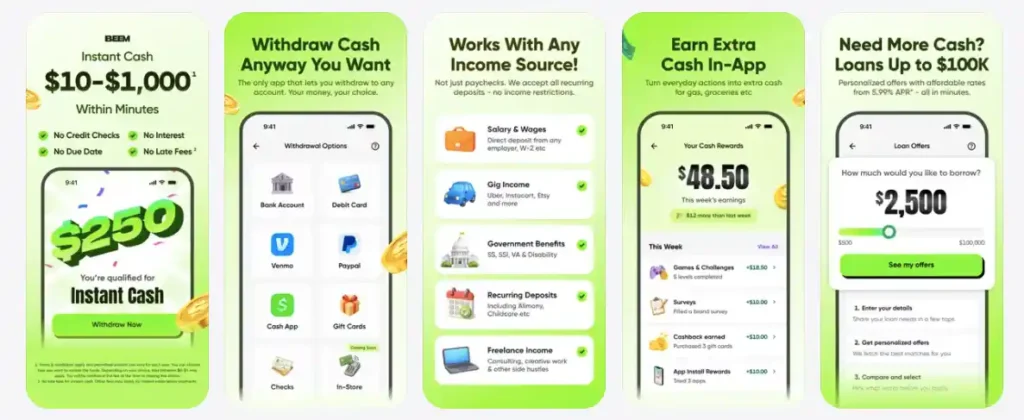
Check out Beem for on-point financial insights and recommendations to spend, save, plan and protect your money like an expert. Download the Beem app today!
FAQs
What is BudgetGPT?
BudgetGPT is Beem’s AI powered budgeting feature that analyzes your bank transactions to give you simple spending insights, smart alerts, and customizable reminders, so you always know where your money is going without manually tracking every expense.
How does BudgetGPT track my expenses?
BudgetGPT connects securely to your bank account and automatically organizes your transactions into categories, giving you a clear picture of your spending without requiring manual entry or categorization.
Can BudgetGPT alert me if I overspend?
Yes. BudgetGPT includes pre-built money alerts that trigger automatically based on your spending patterns, flagging overspending or low balances as they happen. You can also delete or clone these alerts to fit your own needs.
Can I set reminders around my own paycheck cycle?
Yes. BudgetGPT lets you create custom tasks and reminders, such as checking a specific spending category on a certain day each week, with daily, weekly, or monthly frequency options you can customize to match your own pay schedule.
Is my financial data safe with BudgetGPT?
BudgetGPT connects to your bank account through a secure connection designed to protect your financial data while giving you real transaction based insights rather than generic estimates.
How is planning around a paycheck cycle different from a monthly budget?
A paycheck cycle plan is built around the actual days between your paychecks, rather than the calendar month, which often does not line up with when you are paid. This makes it easier to see exactly what you can spend and what is coming due before your next paycheck lands, rather than working from a generic monthly average.